DEMO 01 · AQUATICS
Open on Loom ↗Build the tank that fits.
See how a shopper can explore a tank for their space, then get a suitably sized product bundle.
Turn a shopper's measurements and space photo into three ideas they can actually buy — with the right products and quantities ready for their Shopify cart.
Built by Vinny Tran · 9 years in ecommerce · £600k+ sales with a previous ecommerce brand
Two different products. The same simpler journey from “I've got an idea” to “I know what I need”.
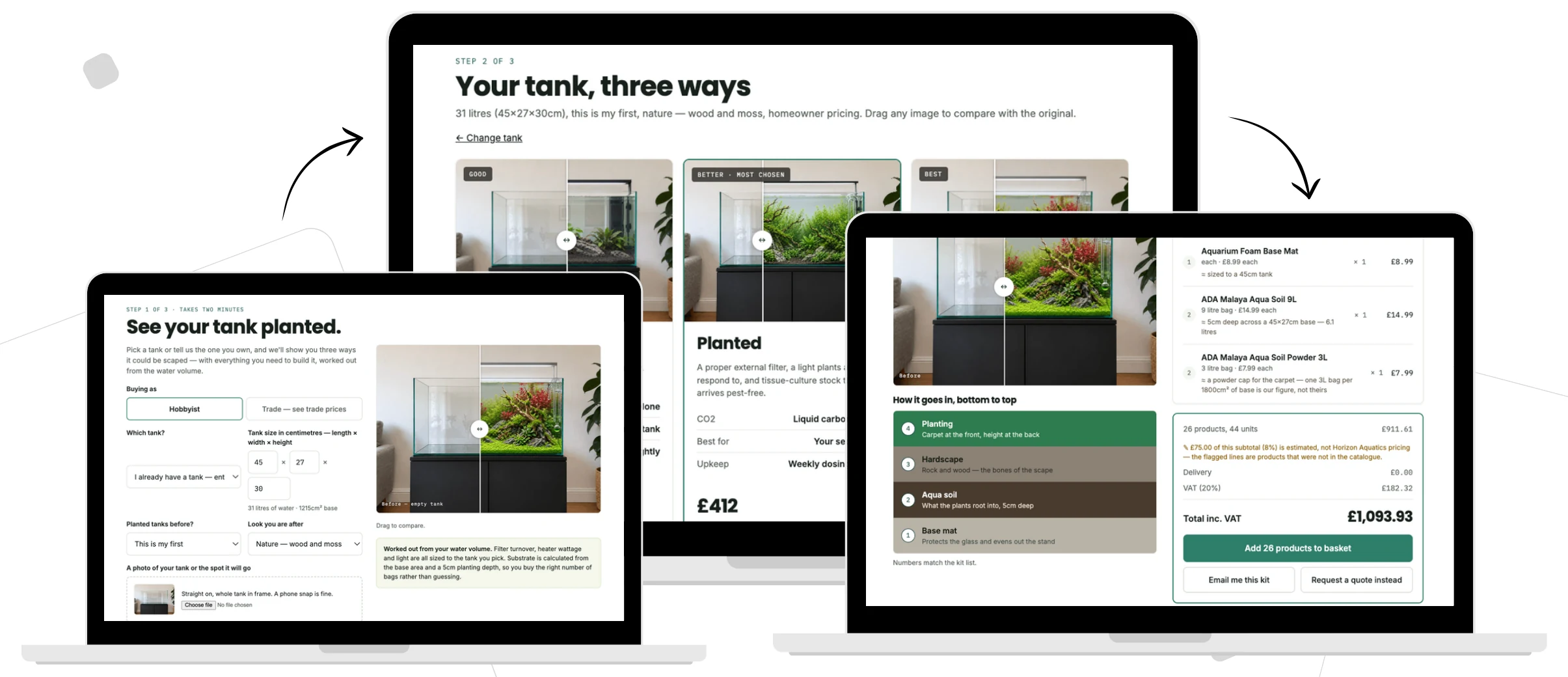
Measurements. Three looks. One complete shopping list.
Illustrative prototype screens; product prices shown are not a quote.See how a shopper can explore a tank for their space, then get a suitably sized product bundle.
See a room photo become design directions and a panelling bundle with the right quantities.
When the customer has to assemble their own shopping list, even a good product page can leave the hard questions unanswered.
Will it look right in my space?
Which products actually go together?
How much do I need without guessing?
Give customers a way to work out what fits and see the result before asking them to choose from a catalogue.
Start with the measurements that matter for the product.
Show the real space, not a generic room set.
Compare design directions in context.
Move the correctly sized products and quantities into the Shopify cart.
Customers can see a possible result for their own space rather than translating specs into a mental picture.
A measured bundle brings the relevant components together, creating a clearer route to a complete basket and higher potential order value.
A more relevant experience can reduce hesitation at the point where sizing and product choice usually get in the way. Results depend on the store and implementation.
Each video shows an example, not a fixed template. A useful version starts with how your own products fit together.
Identify the products, measurements and choices that make up a complete project.
Turn your product rules into bundle quantities and a guided visual journey.
Check representative configurations with you, then agree the Shopify integration and sign-off.
Especially useful when customers need to visualise a result and work out quantities before they buy.
Help shoppers picture a tank in their space and choose a suitable setup.
Turn wall dimensions and a room photo into a look and a product list.
Explore a more guided way to plan and shop a measured outdoor project.
Not in one of these categories? If your products depend on size, space or a combination of parts, let's explore the fit.
They should come from your product and sizing rules, not a generic guess. We would test representative projects together and get your sign-off before launch.
Yes. VisionToCart is designed to work with Shopify themes, using a dedicated page and supporting theme code to connect the configurator to your products and cart. The installation is checked and tested with your theme before it goes live.
Setup takes 5–7 days. That covers configuring your products and sizing rules, installing the tool on your Shopify store, and testing the customer journey through to the cart. You review and sign off the finished setup before launch.
Photo handling, storage and any customer data collection need to be agreed for your implementation and explained clearly to shoppers. The demos are examples, not a published privacy commitment.
Tell me what you sell and where customers get stuck. I'll help you map out what a useful first version could look like.
Reply about my store Already got an email from me? Just reply to it.